

Order History Downloader: Amazon, eBay, Target, Costco & Apple Receipts
Order History Downloader exports Amazon, eBay, Target, Costco, and Apple orders to CSV, Excel, or bulk PDF, free, no login, browser-only.
By the TinyFlash team · Last updated: May 2026
Export Amazon, eBay, Target, Costco & Apple Receipts orders to CSV, Excel, or bulk-PDF, full VAT, refunds with dates, payment methods, and complete ship-to + billing addresses. Multi-account partitioning, recurring-subscription detection, GDPR-ZIP backfill, and a 22-year eBay lookback. All processed in your browser.
| Compatibility | Chrome, Brave, Edge (Manifest V3) |
|---|---|
| Retailers | Amazon (18 storefronts), eBay (22-year lookback), Target, Costco, Apple Receipts |
| Privacy | 100% local processing. No upload, no account, no tracking. |
| License | Free, every feature included, no Pro tier |
| Last updated | May 2026 |
Key features
- Amazon (18 storefronts: US / UK / DE / CA / FR / IT / ES / NL / PL / SE / AU / BR / MX / TR / IN / JP / SG / AE), eBay (22-year buyer-side lookback), Target, Costco, and Apple Receipts (App Store / Music / Books / subscriptions)
- Full VAT / GST / TVA / IVA / MwSt extraction across every Amazon storefront
- Per-item refund tracking with the date issued, best-effort line attribution, not just an order-level total
- Subscribe & Save, promotional discounts, vouchers, gift cards, and Audible credit broken out per order
- Multi-account partitioning, every Amazon account in one viewer, labelled and filtered with one dropdown
- Recurring-subscription detection, Audible, Subscribe & Save, software renewals grouped automatically
- Bulk-PDF invoice export for HMRC / IRS, 50 orders → one ZIP, ~30 seconds
- GDPR-ZIP backfill, drop your Amazon data export and recover every order back to account creation
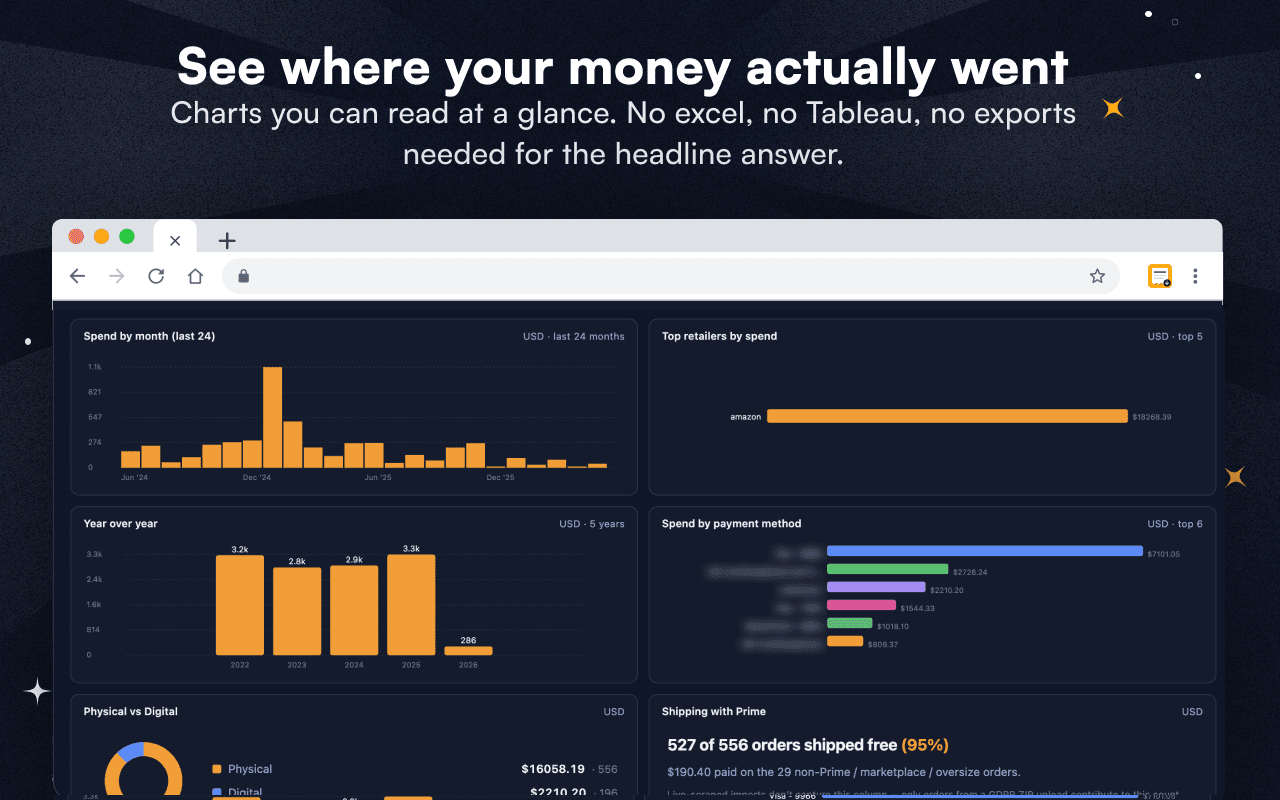
- CSV + multi-sheet Excel exports plus an Insights tab with year-over-year spend
- Manifest V3, all processing in your browser, no account, no tracking, no upload
Multi-language support
GDPR-ZIP backfill
Drop your Amazon GDPR data export and recover every order back to account creation, not just what's still on the orders page.
VAT + per-item refunds
Full VAT / GST / TVA / IVA / MwSt extraction across every storefront, plus per-item refund tracking with the date issued. HMRC- and IRS-ready out of the box.
Multi-account + recurring
Partition by household, business, or partner with one dropdown. Recurring subscriptions like Audible, Subscribe & Save, and software renewals get grouped automatically.
Privacy first
Everything runs locally in your browser. No backend, no analytics, no tracking, no upload, no account. Manifest V3.
Also on the Microsoft Edge Add-ons store.
Screenshots


Key takeaways
- •~90 seconds for a year of Amazon orders, start to finished CSV.
- •18 Amazon storefronts covered (US, UK, DE, CA, FR, IT, ES, NL, PL, SE, AU, BR, MX, TR, IN, JP, SG, AE).
- •8 default-UI languages with localized tax-label extraction per storefront.
- •+1.5 seconds per order when VAT capture is toggled on, shown live in the popup before you commit.
- •50 invoices into one ZIP in ~30 seconds via bulk PDF, HMRC- and IRS-ready.
- •Zero servers, zero accounts. Order data never leaves your computer.
What Order History Downloader does
The extension reads the order pages you can already see when you log in to a supported retailer, then parses each order into a structured row with line items, prices, taxes, refunds, payment method, and shipping address attached. The viewer opens in a new tab once an import finishes, so the import never freezes the page you started from. You then export to CSV for QuickBooks or Google Sheets, to a multi-sheet Excel workbook with Orders, Items, Shipments, and Transactions split across tabs, or to a ZIP of PDF invoices when an accountant needs the original receipts.
Every parser runs in your browser. The only network requests the extension makes are to the same retailer pages you would open by hand. Nothing is uploaded to TinyFlash, no analytics fire, and the diagnostic log stays in local storage unless you click Report a bug.
Amazon order history vs. Amazon purchase history, what's the difference?
Short answer: there is no difference. Amazon's own UI labels the page Your Orders, but a large fraction of shoppers, accountants, and tax-preparers search for the same data using the phrase Amazon purchase history instead of Amazon order history. Both phrases describe the same underlying record: every line item you have bought on Amazon, with its price, tax, shipping address, payment method, and refund status.
Order History Downloader exports both views from the same source data. If you arrived here looking to download your Amazon purchase history for tax filing, FSA or HSA reimbursement, or a yearly spending review, you are in the right place, the CSV the extension produces is exactly the same record Amazon's discontinued Order History Reports tool used to deliver, with VAT, GST, and per-item refund columns added.
Audible purchase history is included automatically. Audible orders and credit purchases settle through your Amazon account, so the same export captures your audiobook receipts alongside the rest of your Amazon order history, no separate setup, no second login.
The same is true across other retailers. Costco calls the page Order history, Target calls it My orders, and eBay splits it between Purchase history on the buyer side and Sold on the seller side; the underlying record is identical, and Order History Downloader normalizes every retailer into the same CSV schema so a household running purchases across all of them ends up with one merged spreadsheet.
The retailers it supports today

Amazon

eBay

Target

Costco

Apple Receipts
Amazon storefronts
18 storefronts, with localized tax-label extraction per host.
amazon.com
EN · Tax
amazon.co.uk
EN · VAT
amazon.de
DE · MwSt
amazon.ca
EN/FR · GST/HST
amazon.fr
FR · TVA
amazon.it
IT · IVA
amazon.es
ES · IVA
amazon.nl
NL · BTW
amazon.pl
PL · VAT
amazon.se
SV · moms
amazon.com.au
EN · GST
amazon.com.br
PT · Imposto
amazon.com.mx
ES · IVA
amazon.com.tr
TR · KDV
amazon.in
EN/HI · GST
amazon.co.jp
JA · 消費税
amazon.sg
EN · GST
amazon.ae
EN/AR · VAT
The Amazon Order History Reports shutdown, and why this exists
Amazon retired its dedicated Order History Reports tool on March 20, 2023. For more than a decade that page produced a CSV of every order on demand, and bookkeepers, freelancers, and tax-prep professionals built whole reconciliation workflows on top of it. The replacement Amazon offers today is the Request My Data flow, which arrives 24 to 72 hours later as a multi-folder ZIP that does not include item-level prices or VAT amounts.
Order History Downloader closes the gap. The same data the old Reports tool emitted, and several fields it never did, land in a CSV in about the time it would have taken to refresh the old report. For accountants who lost a workflow that morning in 2023, this is the modern one-click replacement. Amazon's official help page confirms the deprecation.
What you can do with your exported data
Tax-prep is the first job. Sales tax, VAT, GST, TVA, IVA, MwSt, and BTW each land in their own column when you toggle them on, so a CPA does not need to back values out of an order total. FSA and HSA reconciliation works the same way once medical-category line items are isolated by date range.
Amazon yearly spending reports, the “how much have I spent on Amazon?” or annual spending review most households run before tax season, fall out of the same export. Group the CSV by month, category, or payment method in QuickBooks or Sheets and the totals your bank statement hides become a single pivot table. The dedicated walkthrough is on the Amazon yearly spending report guide.
Bookkeepers running multi-client books across multiple Amazon accounts partition by account hash and re-run the export weekly against the watermark from the last successful run. The viewer's incremental import option keeps re-runs fast and prevents duplicates. Per-item refunds with the date issued, broken out from the order-level total, are the line accountants explicitly request.
Households with shared Prime accounts, families running a Subscribe & Save grocery cadence, and anyone trying to feed a year of receipts into ChatGPT or Claude for an annual-review prompt all get the same clean CSV. The recurring-subscription detector groups Audible audiobook purchases, software renewals, and monthly grocery orders so they do not flood the row count, your full Audible purchase history is captured automatically inside the Amazon export, with no separate Audible login required.
Privacy: how Order History Downloader stays out of your data
All processing happens in your browser. No order data leaves your computer. That is the design constraint behind every choice in Order History Downloader, and it is why there is no login, no remote sync, and no analytics anywhere in the extension.
The extension uses your existing logged-in retailer session and never sees a password. Saved data lives only on your device, and the diagnostic log is shared only if you explicitly click Report a bug. Permissions are minimal and justified line-by-line in the Chrome Web Store listing.
The full policy is on the TinyFlash privacy page.
Browse guides by use case
Twenty walkthroughs across taxes, refunds, multi-account households, cross-retailer exports, plus how-to and troubleshooting reference.
How to use Order History Downloader
Full getting-started guide: install, pick a retailer, run an import, use the viewer, and export.
Got the Amazon data-request confirmation email?
What to do after Amazon emails you. Wait times, download-link logistics, and the upload step when the ZIP arrives.
What is inside your Amazon data ZIP
Folder-by-folder breakdown of the 50+ subfolders, the one file OHD actually needs, and the 28-column CSV reference.
eBay 22-year purchase history
Pull every eBay buyer-side order back to 2002 in one CSV. Every other tool caps at 2 years.
Apple receipts export
App Store, iTunes, Apple Music, iCloud+, TV+, Books, with auto-flagged subscriptions.
FAQ
Privacy, supported retailers, pricing, troubleshooting, multi-account, GDPR backfill, and more.
Keyboard shortcuts
Cmd+Shift+E (Mac) or Ctrl+Shift+E (Windows) opens the viewer, plus the rebind guide.
Troubleshooting
Apple lockouts, Costco empty imports, Amazon sign-in mid-import, viewer blank, organised by symptom.
Changelog
Release notes for the current Order History Downloader build.
Download Amazon order history
Flagship walkthrough: install, run, and pull a year of Amazon orders into a clean CSV in about 90 seconds.
Amazon Order History Reports replacement
Amazon retired Order History Reports on March 20, 2023. Here is the modern one-click replacement.
Amazon order history for taxes
Build IRS- and HMRC-ready exports with sales tax, VAT, and per-item refunds already broken out.
Amazon yearly spending report
Group your year by month, category, or payment method and surface the totals your bank statement hides.
Amazon orders across multiple accounts
Partition household, business, and shared-prime accounts into one viewer with a single dropdown.
Bulk download Amazon invoices
Stream 50 invoice PDFs into one ZIP in roughly 30 seconds, ready for an HMRC or IRS file.
Amazon data export and GDPR backfill
Drop your Amazon Request-My-Data ZIP and reach every order back to account creation.
Amazon refund history
Per-item refunds with the date issued and payment-method breakouts, including partial refunds matched back to the original line item.
Amazon VAT invoice download
Pull VAT, MwSt, TVA, IVA, and BTW invoices across nine European Amazon storefronts in one batch.
Costco purchase history
Pull your Costco order history into CSV without re-keying a single line by hand.
All supported retailers
Full coverage map: Amazon (18 storefronts), eBay (22-year lookback), Target, Costco, and Apple Receipts.
Frequently asked questions
What does Order History Downloader do?
Order History Downloader is a free Chrome extension that exports your Amazon, eBay, Target, Costco, or Apple Receipts order history into a clean CSV, Excel sheet, or zip of PDF invoices, entirely in your browser, with no login required for the extension itself.
Which retailers are supported?
Order History Downloader supports Amazon (18 storefronts: US, UK, DE, CA, FR, IT, ES, NL, PL, SE, AU, BR, MX, TR, IN, JP, SG, AE), eBay (with a 22-year buyer-side lookback across .com, .co.uk, .de, .fr, .it, .es, .ca, .com.au), Target, Costco, and Apple Receipts. Each uses your existing logged-in session on the retailer site.
Is Order History Downloader free?
Yes, every feature is free, including multi-account partitioning, shipping-address capture, per-item refund tracking, and bulk PDF export. There is no Pro tier and no subscription.
Does Order History Downloader send my data anywhere?
No. Order History Downloader runs entirely in your browser. Order data is parsed, grouped, and exported on your device, it does not leave your computer and is not sent to TinyFlash or any third party.
Do I need an account to use Order History Downloader?
No. Order History Downloader uses your existing logged-in session on each retailer's site. You never give the extension a password.
Why does this extension exist when retailers offer their own export?
Most retailers offer a slow, multi-day data-request flow that arrives as a multi-folder ZIP without item-level prices. Amazon retired its dedicated Order History Reports tool on March 20, 2023. Order History Downloader replaces those workflows with a one-click export that finishes in minutes.
How do I archive old Amazon orders?
Amazon's built-in archive feature only hides orders from your Your Orders view, the data still lives in your account, and Amazon offers no way to download an archive as a single file. Order History Downloader is the practical way to archive Amazon orders: export the full record to CSV, Excel, or a ZIP of PDF invoices, then store it wherever you keep your other tax records. Run the export once a year before tax season and you have a permanent archive that does not depend on Amazon's UI.
What is the difference between Amazon order history and Amazon purchase history?
There is no difference. Amazon labels the page Your Orders, but many shoppers and accountants search for the same data using the phrase Amazon purchase history. Both phrases describe the same record: every line item bought on Amazon with prices, taxes, shipping, payment, and refund status. Order History Downloader exports the same CSV either way.
Does this include Audible purchase history?
Yes. Audible orders and audiobook credit purchases settle through your Amazon account, so the same Amazon export captures your Audible purchase history alongside the rest of your orders. There is no separate Audible login or second extension.
Sister tools by TinyFlash

Video Speed Controller Pro
Adjust video playback speed on YouTube, Netflix, and any HTML5 video with customizable keyboard shortcuts. Free for Chrome, Brave, and Edge.
Stop hand-typing your order history.
Export a year of Amazon orders in 90 seconds. Add eBay (22-year lookback), Target, Costco, and Apple Receipts on top. Full VAT, refunds with dates, multi-account, GDPR-ZIP backfill. CSV for QuickBooks or Sheets, multi-sheet Excel for full receipts, bulk PDF for HMRC. 100% local. No account. No upload. No tracking.
Supported languages
8 default-UI languages plus Canadian-French and UK-English variants.